


Noah System 4.117 was released in September 2025.
Starting with Noah System 4.15, the Microsoft CE Database is replaced by SQLite. Support for the SQL CE database has been discontinued by Microsoft. Due to this major upgrade, a number of additional installation guidelines apply.
If you already have Noah 4.15 or newer installed on your PC, then your Noah installation has been migrated to SQLite and the upgrade to Noah 4.16 and newer will be quick and straightforward.
For all other Noah versions, please follow the following step-by-step procedure to upgrade to Noah System 4.117 or 4.16.
Prerequisites
To upgrade to Noah System 4.117 or 4.16, the computer will need to be running Noah System 4.14. If you are running an earlier version the update will not proceed. If the installation is not yet on Noah 4.14 please see Upgrade Path for Unsupported Noah System Versions – HIMSA.
Migrating the Noah Database
As part of the Noah System 4.117 installation, the Microsoft SQL CE database will automatically be replaced with the new Microsoft SQLite database.
IMPORTANT: Please note that the migration can take multiple hours depending on your setup. Please see details below.

Before the database is migrated from CE to SQLite, a database backup will be made and the DB Maintenance tool will run on the database. The upgrade will create a separate backup folder and move the old Microsoft CE database backups to C:\ProgramData\HIMSA\Noah\Backup\DatabaseCEBackup for locations that use the default backup location.
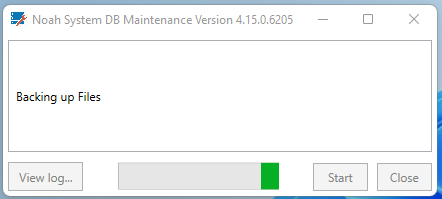
The DB Maintenance tool will run and display the progress made. This may take some time to complete. For an example, a 2GB database may take 20 minutes to backup and to run the DB Maintenance tool.
After the DB Maintenance tool has run, the migration to SQLite will begin, progress will be displayed.

Expected Migration Time: HIMSA’s testing indicates that a mid-range machine should expect 30 minutes per gigabyte in the database. As an example, a 2GB database would take an hour to migrate, whereas a 4GB database would take 2 hours. Outdated or machines of less capability should expect about 1 hour per gigabyte, respectively 2 hours for a 2GB database, or 4 hours for a 4GB database. HIMSA advises you start the migration when there is more time available than anticipated.
Other database changes include:
- The Noah Configuration database, NOAHCfgDatabase.sdf, will no longer be stored as a separate database file but rather an xml file
- The Activity log and the WSI databases are also moved to SQLite
- The new SQLite database has a 4GB size limit
- The SQLite Noah database file is located at C:\Program Files (x86)\Common Files\HIMSA Shared and called NOAHDatabaseCoreSQLite.db
Logging in to Noah 4.117
On a new computer:
When installing Noah 4.15 or newer on a new computer that has never had Noah installed before, the log in settings are as follows:
- The log in system is enabled by default. The user will be required to enter a password for the default user ABC. Password is 123.
If the user just clicks OK on the log in without entering a password, they will be presented with ‘Invalid login. Please try again.’ - The password is set to expire after 30 days. This setting may be desired, but the setting can also be modified or disabled if needed.
- The Login settings are found in the Noah Console under Security Administration, Login.

On a Noah upgraded computer:
For upgrades to Noah 4.117, the Noah 4.14 settings are preserved. Users and user settings that were present in 4.14 are the same.
Issues during migration
Patient Data
Q: What happens if my patient data fails to migrate?
A: If your patient database is not migrated the installation will be cancelled, and Noah will not be upgraded. Your Noah will continue to function, and we advise that you attempt the 4.117 installation process again. If it continues to fail, please contact your Noah support engineer for additional assistance.
In the case of a failed migration from the Microsoft CE database to SQLite, it is always helpful to grab the log files generated in the Noah Console. The SQLCEToSQLite.log contains good information on the migration progress and errors if they occur.
Activity Log
Q: What is the Activity Log?
A: The Activity Log contains records of all actions performed within Noah. You can read more details about its contents here: The Noah Activity Log
Q: If there is an issue migrating the Activity log, an option will be offered to ignore migrating the Activity log. What happens if I elect to ignore migrating it?
A: If the Activity Log is not migrated, Noah will generate a new and empty Activity Log. Your old Activity Log will not be deleted, but it will not be migrated to the new SQLite database.
 HIMSA
HIMSA