



New Product Development
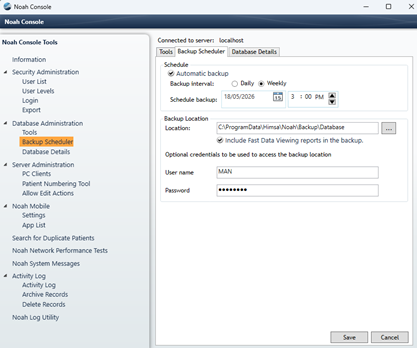
The Noah System 4 Backup Scheduler is set by default to back up your Noah database automatically. The backup will proceed even when Noah 4 is in use, and if the computer is shut off at the scheduled time the backup will complete upon boot up.
The backup files are stored by default at C:\ProgramData\HIMSA\Noah\Backup\Database. You can set your Noah backup to any location of your choosing. For added protection you may want to consider changing the backup destination to a different machine and to a secure location so that only authorized users have access to database backups.
You can view the backup settings under Database Administration in the Noah Console:
Important: Noah does not delete older backups. We therefore advise that you check the backup folder occasionally to delete backups that are no longer needed.
More details on backing up the Noah database can be found here.

 HIMSA
HIMSA