


Setting Security Rights in SQL Server 2016 or later when using Windows Authentication with Noah 4.117.x
The purpose of this document is to complete the setup for Noah 4.117.x to use SQL 2016 or later with Windows Authentication. If you are using Mixed Mode Authentication, you do not need to perform the steps below.
These steps apply whether you are upgrading from 4.1X.X to 4.117 or you are installing a fresh install of 4.117. These are the steps that must be followed to ensure that SQL Server integration with Windows authentication is either maintained or established adequately from the start.
NOTE: The directions below are to be completed after first following the directions listed on the page ‘Configuring Noah 4 to use a SQL Server Database‘.
1. Launch the SQL Server Management Studio (SSMS) utility. Open the Security Tab on the left-hand side. Then expand Logins.
2. Under Logins, right-click on Logins, and then create a new login named NT AUTHORITY\NETWORK SERVICE:
- Make sure the Windows Authentication mode is selected.
- Select NOAHDatabaseCore for the default database.

3. Click OK to save new login.
4 . Right click and select Properties on NT Authority\Network Service.
5. Select User Mapping.
6. Select NOAHDatabaseCore.
7. Select db_owner.
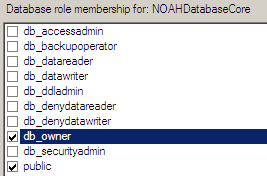
8. Once this is done, exit the Properties window by clicking OK.
9. Select the New Query button. A new query will open.
10. Make Sure NOAHDatabaseCore is the selected database.
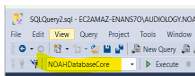
11. In the new Query enter the following:
EXEC sp_addrolemember N'db_owner', N'NT AUTHORITY\NETWORK SERVICE';
12. Once you entered in the text above, click on Execute. This command should execute immediately. When it is completed, you will see the message, “Command Completed Successfully” as the returned message.

13. Once that is done, please close SSMS.
14. Restart the server.
15. Attempt to log in to Noah.
Additional Steps: If your installation of Noah System 4.117.x was an upgrade from a previous version of Noah that was using Full SQL Server with Windows Authentication, please follow these additional steps:
16. Log in to SSMS.
17. Go to Logins, right click on NT AUTHORITY\SYSTEM right click on properties.
18. Select User Mapping.
19. Select NOAHDatabaseCore.
20. Uncheck db owner and select OK.

 HIMSA
HIMSA