


HIMSA provides Noah in two main versions. The version of Noah you use or plan to use will greatly impact this topic.
Noah System
Noah System is an on-premise-only installed application where HIMSA does not have access to patient data, nor can it configure your installations (e.g., setup and maintenance). Your technical support is provided by the HIMSA member company or distributor that your organization purchased Noah from. Additionally:
- HIMSA has or does not enter into a Business Associate Agreement (BAA) or a Data Processing Agreement (DPA) with your organization, as it is not necessary
- Your organization does not have an ongoing support agreement with HIMSA, and it is not offered. You may have a support agreement with the HIMSA member company or the distributor from whom you purchased Noah.
- Click here for more Information about Noah System.
Noah ES
Noah ES is a cloud-enabled version of Noah, where patient data and user management services are provided by HIMSA, utilizing MS Azure technologies such as Azure SQL-based failover groups and protected databases, as well as optional integration with your Entra ID (and other third-party identity providers). Noah ES is supplied via a per-user subscription model. Additionally:
- HIMSA does enter into a Business Associate Agreement (BAA) or a Data Processing Agreement (DPA), depending on the country your business is located in.
- The Noah ES terms of service does provide for an ongoing support agreement with HIMSA.
- Click here for more information about Noah ES.
IMPORTANT NOTE: The rest of this page specifically refers to Noah System. If you have security-related questions about Noah ES please click here.
Q: I have vendor Application, Security, and Technology questionnaires that need to be completed for my organization. My organization requires that this be completed by HIMSA, how can this be achieved?
A: HIMSA provides two main options, as follows:
- Use the information on the rest of this page to fill out your questionnaires:
- If you have a small number of questions (3-4) on a topic that is not covered below, you may ask HIMSA directly by opening a support issue. Click here to open a request
- Your Noah technical support contact at a HIMSA Member Company may also be able to assist you.
- Ask HIMSA to provide a Quote to fill out your form:
- You can open a special support issue and ask HIMSA to provide a cost estimate on what it will take to fill out your forms. The typical cost is between 500 and 700 US$. Click here to open a request – you will be directed to our support system.
- Q: Why does HIMSA charge for this service? A: The Typical forms that we have received take a great deal of time to fill out. HIMSAs pricing structure for wholesaling software to our distributors does not include this service. HIMSA is happy to provide the service but a vast majority of Hearing Care Businesses do not require this service.
Noah System 4 Network and Data Flow Diagram
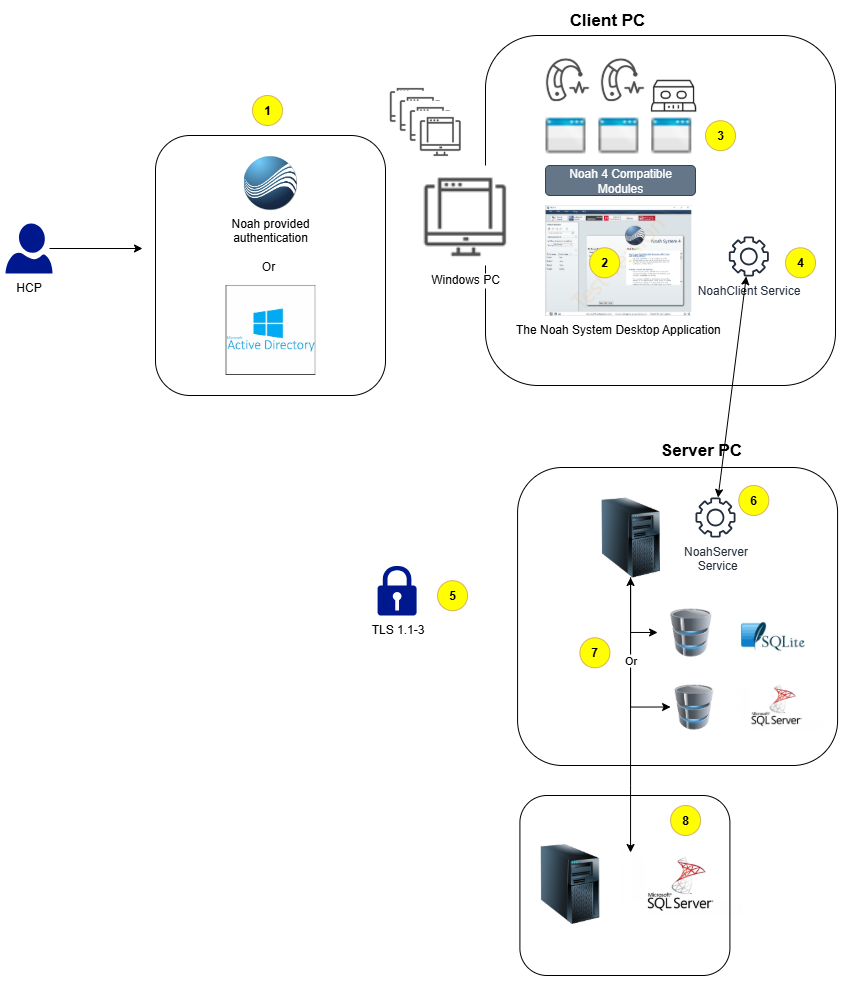
| Diagram Section | Description | Related Information |
|---|---|---|
| – | Noah System 4 is not a cloud-based solution. Noah System 4 is designed to run within a private and secure network, where all PCs are protected by business-quality antivirus/endpoint protection software. Each Hearing Care Business is responsible for ensuring a proper, private, and secure network. If you use Noah 4 in an unsecured network, your PC, Noah installation, and patient database could be at risk. WAN Support Statement | |
| 1 | When a Hearing Care Professional (HCP) uses Noah System, they are first identified, authenticated, and authorized by the following systems: A. The Noah System provides basic user management features that allow administrators to create, remove, and reactivate user accounts. Users log in using a username and password, which is the most popular method. B. Noah System also provides support for integrating with an on-premise version of Microsoft Active Directory. Users can log in by any method supported by the Active Directory Implementation. (NOTE: The Hearing Care Business (HCB) is responsible for setting up and managing Active Directory.) | Active Directory Integration Requirements, including installation and integration guides |
| 2 | Hearing Care Professionals (HCPs) will interact with the Noah System client software. The client software provides features for searching for and selecting patient records. Once a patient is selected, it is then possible to view basic patient information. The most prevalent data to view is the latest pure tone audiogram (hearing loss) data presented in graphical form. As new data is created, a session history is populated, making it easy for the HCP to review history and open older historical data by the application that created it. | |
| 3 | HIMSA Member companies create Noah-compatible software that integrates with Noah. These applications are known as “Modules.” Modules typically provide features to diagnose hearing loss or custom-program hearing instruments for a patient. Modules are installed on each PC/Noah client. Each HIMSA Member company distributes these software applications. These applications gain access to the currently selected patient record. The selection of patient records is controlled by the HCP. These applications are approved by the Hearing Care Business IT or other management staff by agreeing to install the software on the PC. | Noah compatible modules certified by HIMSA |
| 4 | Each client PC uses an installed Windows Service named “NoahClient.” This service facilitates communication between the client and server. | |
| 5 | By default, the communication between Noah Client and Noah Server is encrypted with TLS (Transport Layer Security) protocol. The strength of the encryption used within the TLS session is determined by the encryption cipher negotiated between the Windows operating system hosting the Noah Server and the Windows operating system hosting each of the Noah Client installations. | HIMSA does not provide technical assistance on configuring cipher suites and priority order, but information can be found here. |
| 6 | A Server PC is used to provide a common database that can be shared between all client PCs. The Noah Server service communicates with all client PCs over a secure connection. | WAN Support Statement |
| 7 | Noah System uses two separate databases for storage: A. Patient database – This is the database that contains patient records and associated hearing loss details and hearing aid programming sessions B. Activity Log database – This database is used to record user activity within the system, an audit trail. The database technology that can be used is: A. SQLite – This is a free database provided by HIMSA and provides for up to 4 GB of storage. This is the most popular database in use for Noah System. B. Microsoft SQL – The HCB use this option if the business needs more than 4 GB of storage or wants to meet internal requirements. | FAQ for locations configuring Noah to use Microsoft SQL Server Configuring Noah 4 to use a SQL Server Database |
| 8 | If Microsoft SQL is used it is typically implemented where the database is on the same server as the Noah Server Service. If desired by the business it is possible to use a SQL server that is hosted on a different server in the network. |
| General Info | |
|---|---|
| What technology is Noah based on? | Noah uses .NET 4.8 as the target framework |
| Does the Noah application save and store Protected Health Information (PHI)? | Yes |
| Does the application make available documentation that explains error or messages to users and system administrators and information on what action is required? | Yes |
| Does the application’s client software operate without requiring the user to have local administrator-level rights to run the application? | Yes |
| link to server operating system and hardware resource requirements |
| Security Review | |
|---|---|
| Does HIMSA conduct regular software code reviews and dynamic/static testing on vendor-developed software to identify and remediate common vulnerabilities (such as those identified by OWASP)? | Yes |
| Does HIMSA conduct regular third-party penetration tests against its solution? | Yes |
| Does HIMSA have a formal process for assessing, remediating and disclosing vulnerabilities which are received from third party sources (vulnerability disclosure process)? | Yes |
| Does HIMSA conduct regular vulnerability scans of its solution? | Yes |
| Unique User Identification | |
|---|---|
| Does the system offer unique login name for all users and administrators? | Yes |
| Are account roles identified and documented? | Yes |
| User Authentication/Authorization | |
|---|---|
| Can this system use Active Directory for user authentication and to determine user rights? | Yes |
| Password Standards | |
|---|---|
| Does the system support and enforce password changes? | Yes |
| Does the system offer complex passwords with the following minimum attributes? A. Minimum of 8 characters B. Inclusion of at least three of the following elements: An alpha character A numeric character A capitalized letter or punctuation or non-alphanumeric character (e.g., !@#*+) | Yes |
| Inactive Sessions | |
|---|---|
| Does the system provide a feature for session timeout that will terminate the session screen after a set number of minutes of inactivity? | No |
| Encryption | |
|---|---|
| Will information at rest on computing devices be encrypted? | Yes, there is the option in the Noah Console to encrypt the database |
| Does the application encrypt data in transit? | Yes, data is encrypted as it is passed between the Noah server and Noah client services. |
| What is the Noah encryption standard? | By default, the communication between Noah Client and Noah Server is encrypted with TLS (Transport Layer Security) protocol. Noah supports versions 1.0, 1.1 and 1.2. The strength of the encryption used within the TLS session is determined by the encryption cipher negotiated between the Windows operating system hosting the Noah Server and the Windows operating system hosting each the Noah Client installation. HIMSA does not provide technical assistance on the configuration of cipher suites and priority order but information can be found here. |
| Are the application’s user passwords hashed in the database table and not viewable even to the system administrators? | Yes |
| User Access Audit Logs | |
|---|---|
| Will application create a secure audit record each time a user accesses, creates, edits, or deletes (PHI) via the system? | Yes |
| Does the audit log contain at least a) A unique user Identifier, b) a patient identifier, c) the function performed, d) time and date the function was performed? | Yes |
| Are the audit logs exportable? | Yes |
| Are the audit logs archivable? | Yes |
| Networking and Virtualization | |
|---|---|
| Does the technology support TCP/IP connections? | Yes |
| What are the required ports for Noah? | 8200, 8206 |
| Is Noah a hosted, “cloud computing,” or software-as-a-service (SaaS) application? | No |
| Does the application require any external connectivity inbound or outbound? | No |
| Will the technology require a wireless network connection? | No |
| Can the technology run across a routed interface? | Yes |
| Is the technology Citrix enabled? | No |
| Is the Noah Server application supported in a virtual environment, for example VMWare? | Yes |
| Database Information | |
|---|---|
| What is the default database solution? | SQLite |
| Can the Noah application be configured with Microsoft SQL Server? | Yes |
| Can the database be installed on a separate database server? | Yes |
| Can the database run in a high availability (HA) clustered environment? | Yes |
| link to supported SQL Servers |
| Artificial Intelligence (AI) | |
|---|---|
| Does Noah contain or use any Artificial Intelligence (AI) components? | No |
| Backup and Recovery | |
|---|---|
| Does the Noah application have any tools for database backup and recovery? | Yes |
| What is the backup responsibility if using Microsoft SQL Server? | Locations utilizing SQL Server are responsible for backing up their Noah database on the SQL server. |
| Antivirus | |
|---|---|
| Is the application compatible with commercial off-the-shelf virus scanning software products for removal and prevention from malicious code? | Yes |
| Deployment | |
|---|---|
| Does the application currently have a deployment package available for client installations? | Yes |
 HIMSA
HIMSA